5 Powerful Updates to HCP Terraform for Enhanced Cost Visibility and Governance
Managing infrastructure at scale is no easy task—especially when you're juggling costs, security, and collaboration across multiple teams. HashiCorp's latest round of improvements to HCP Terraform (and Terraform Enterprise) delivers exactly the tools platform engineers have been asking for. From granular cost analytics to project-level remote state sharing, these five updates tackle common blind spots and give organizations tighter control over their infrastructure lifecycle. In this article, we break down each new feature—how it fills a previous gap, what you can do with it, and why it matters for your workflows. Whether you're a cloud architect, a DevOps lead, or a FinOps specialist, these enhancements are designed to help you make smarter decisions and reduce operational friction. Let's dive into the details.
1. Billable Resource Analytics: Full Transparency into Infrastructure Spending
One of the biggest frustrations for organizations using resource‑under‑management (RUM) billing was the inability to see where costs actually came from. Previously, HCP Terraform only showed the total count of billable managed resources at the organization level, leaving teams guessing about which projects or workspaces were driving consumption. This made cost forecasting and optimization nearly impossible.
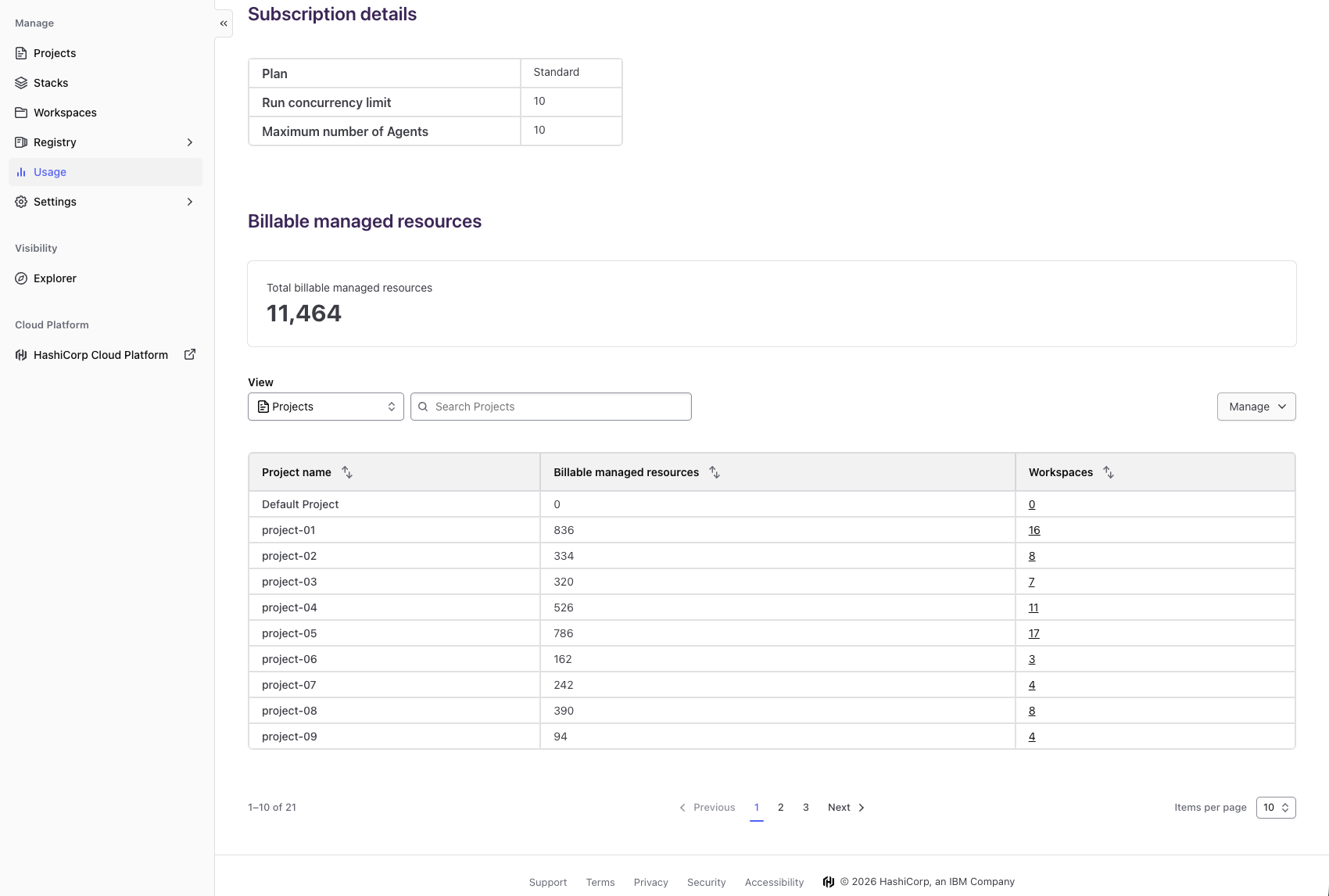
With the general availability of billable resource analytics, that lack of visibility is finally addressed. Now you can view a self‑service dashboard that breaks down consumption by project and workspace directly on your existing usage page. Decision‑makers can immediately identify high‑cost areas, spot waste, and take action—whether that means right‑sizing resources or consolidating underused ones. The result is proactive cost management instead of reactive billing surprises.
Benefits include better cost predictability and data‑driven resource allocation. Organization owners can align infrastructure spending with business priorities, working closely with engineering teams to keep budgets on track. If you're on a paid HCP Terraform plan, simply navigate to the usage page to explore this new view.
2. Project‑Level Remote State Sharing: Secure, Granular Data Access
Platform teams managing large‑scale infrastructure have long faced a tough trade‑off: share state data widely for operational flexibility, or keep it tightly locked for security. The previous organization‑wide sharing model forced one extreme or the other, often leading to either over‑permissioned access or cumbersome manual workarounds.
The new project‑level remote state sharing (now generally available) solves this by letting you control state access on a per‑project basis. You can define exactly which other projects can read from a given project's state, and even restrict within a project by workspace. This granularity means teams can share necessary outputs—like VPC IDs or database endpoints—without exposing sensitive infrastructure details to everyone.
For platform engineers, this reduces risk while maintaining the agility needed for cross‑team collaboration. Adoption requires only small configuration changes in your Terraform settings, and it integrates seamlessly with existing run and policy checks. The result is a more secure, yet still flexible, approach to state management.
3. Module Testing for Dynamic Credentials: Safer Validation Without Hardcoding
Testing Terraform modules that use dynamic provider credentials—like AWS STS or temporary tokens—has historically been awkward. Engineers often had to hardcode static credentials into test files just to verify module behavior, which introduced security risks and added maintenance overhead.
With the general availability of module testing for dynamic credentials, you can now run terraform test using the actual dynamic credentials configured in your workspace or environment. No more hardcoded secrets or separate test pipelines. The framework automatically handles credential passthrough, so your tests accurately reflect production conditions while keeping sensitive values out of source control.
This feature is especially valuable for teams that rely on short‑lived tokens or assume roles across accounts. It encourages a testing culture where module validation is both thorough and secure. Simply update your test configuration to reference dynamic credentials, and you're ready to run tests with confidence.
4. Project‑Level Notifications: Targeted Alerts for Every Run Event
Before this update, notifications in HCP Terraform were set only at the organization level. That meant every alert—whether a run failure, planning success, or apply completion—went to the same set of recipients. Teams working in large organizations often found themselves overwhelmed with irrelevant alerts, or worse, missing critical notifications buried in the noise.
Now, project‑level notifications are generally available, allowing you to configure separate notification channels (like Slack, webhooks, or email) for each project. You can choose exactly which run events trigger an alert: from planning started to apply errored. This granularity ensures that the right people get the right information at the right time.
For platform teams, this means reduced alert fatigue and faster response times. A project focused on production deployments can notify its on‑call team immediately, while a sandbox project might only alert on failures. Setup takes just a few clicks in the HCP Terraform UI, and existing organization‑level notifications remain unaffected.
5. Registry Tagging (Beta): Organize and Discover Modules and Providers
As private registries grow, finding the right module or provider becomes a challenge. Without a tagging system, teams rely on naming conventions or external documentation—both of which are error‑prone and hard to maintain. HashiCorp introduces registry tagging as a beta feature to solve this.
With tags, you can attach metadata—such as production, networking, compliance, or version 2.0—to your modules and providers stored in the private registry. This makes discovery much easier: users can filter by tag, search for specific use cases, and quickly understand the purpose or status of each component. Tags are also visible in the registry UI and search results.
During the beta, you can add tags via the API or registry settings. This simple addition streamlines governance by making it clear which modules are approved for production use, and it helps new team members get up to speed faster. Expect this feature to evolve based on feedback before full general availability.
Conclusion
These five updates to HCP Terraform and Terraform Enterprise address real pain points that organizations face when scaling infrastructure management. From cost analytics that turn billing data into actionable insights, to secure state sharing and targeted notifications, each feature adds a layer of control and visibility that was missing before. Whether you're a FinOps specialist tracking spending, a platform engineer managing state access, or a developer wanting safer module testing, these improvements make your daily work more efficient and secure. Start exploring the features available to you—most are already in general availability, and registry tagging is open for beta testing. To learn more, check out the cost analytics, state sharing, dynamic credential testing, project notifications, and registry tagging sections above for configuration details.